 TPower Design
Appearance
CSS 规范
原生CSS规范
- 命名
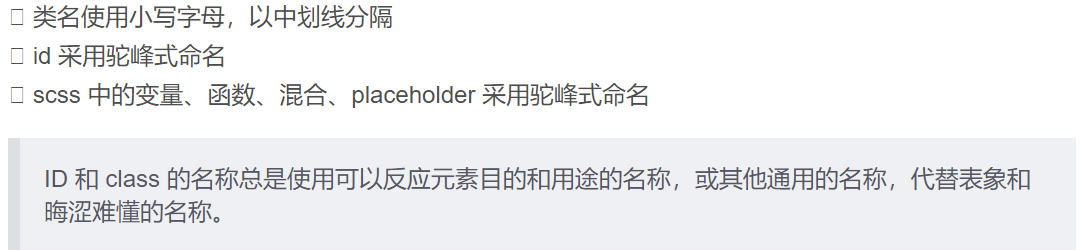
不推荐:
css
.fw-800 {
  font-weight: 800;
}
.red {
  color: red;
}
推荐:
css
.heavy {
  font-weight: 800;
}
.important {
  color: red;
}
- 选择器 2.1 css 选择器中避免使用标签名
从结构、表现、行为分离的原则来看,应该尽量避免
css中出现HTML标签,并且在css选择器中出现标签名会存在潜在的问题。
2.2 使用直接子选择器
很多前端开发人员写选择器链的时候不使用直接子选择器(注:直接子选择器和后代选择器的区别)。有时,这可能会导致疼痛的设计问题并且有时候可能会很耗性能。 然而,在任何情况下,这是一个非常不好的做法。如果你不写很通用的,需要匹配到DOM末端的选择器,你应该总是考虑直接子选择器。
不推荐:
css
.content .title {
  font-size: 2rem;
}
推荐:
css
.content > .title {
  font-size: 2rem;
}
2.3 尽量使用缩写属性
不推荐:
css
border-top-style: none;
font-family: palatino, georgia, serif;
font-size: 100%; line-height: 1.6;
padding-bottom: 2em;
padding-left: 1em;
padding-right: 1em;
padding-top: 0;
推荐:
css
border-top: 0;
font: 100%/1.6 palatino, georgia, serif;
padding: 0 1em 2em;
2.4 每个选择器及属性独占一行
不推荐:
css
button {
  width: 100px;
  height: 50px;
  color: #fff;
  background: #00a0e9;
}
推荐:
css
button {
  width: 100px; height: 50px;
  color: #fff;
  background: #00a0e9;
}
2.5 省略 0 后面的单位
不推荐:
css
div {
  padding-bottom: 0px;
  margin: 0em;
}
推荐:
css
div {
  padding-bottom: 0;
  margin: 0;
}
2.6 避免使用 ID 选择器及全局标签选择器防止污染全局样式
不推荐:
css
#header {
  padding-bottom: 0px;
  margin: 0em;
}
推荐:
css
.header {
  padding-bottom: 0px;
  margin: 0em;
}
LESS规范
- 代码组织
1.1 将公共 less 文件放置在 assets/style 文件夹
例: // color.less,common.less
1.2 按以下顺序组织
- @import;
- 变量声明;
- 样式声明;
less
@import "mixins/size.less";
@default-text-color: #333;

.page {
  width: 960px;
  margin: 0 auto;
}
- 避免嵌套层级过多
将嵌套深度限制在3级。对于超过4级的嵌套,给予重新评估。这可以避免出现过于详实的CSS选择器。避免大量的嵌套规则。当可读性受到影响时,将之打断。推荐避免出现多于20行的嵌套规则出现。
不推荐:
less
.main {
   .title {
      .name {
           color: #fff;
         }
     }
}
推荐:
less
.main-title {
  .name { color: #fff; }
}